AI AUTOMATION • BULK DATA SORTING

SORT DATA WITH AI

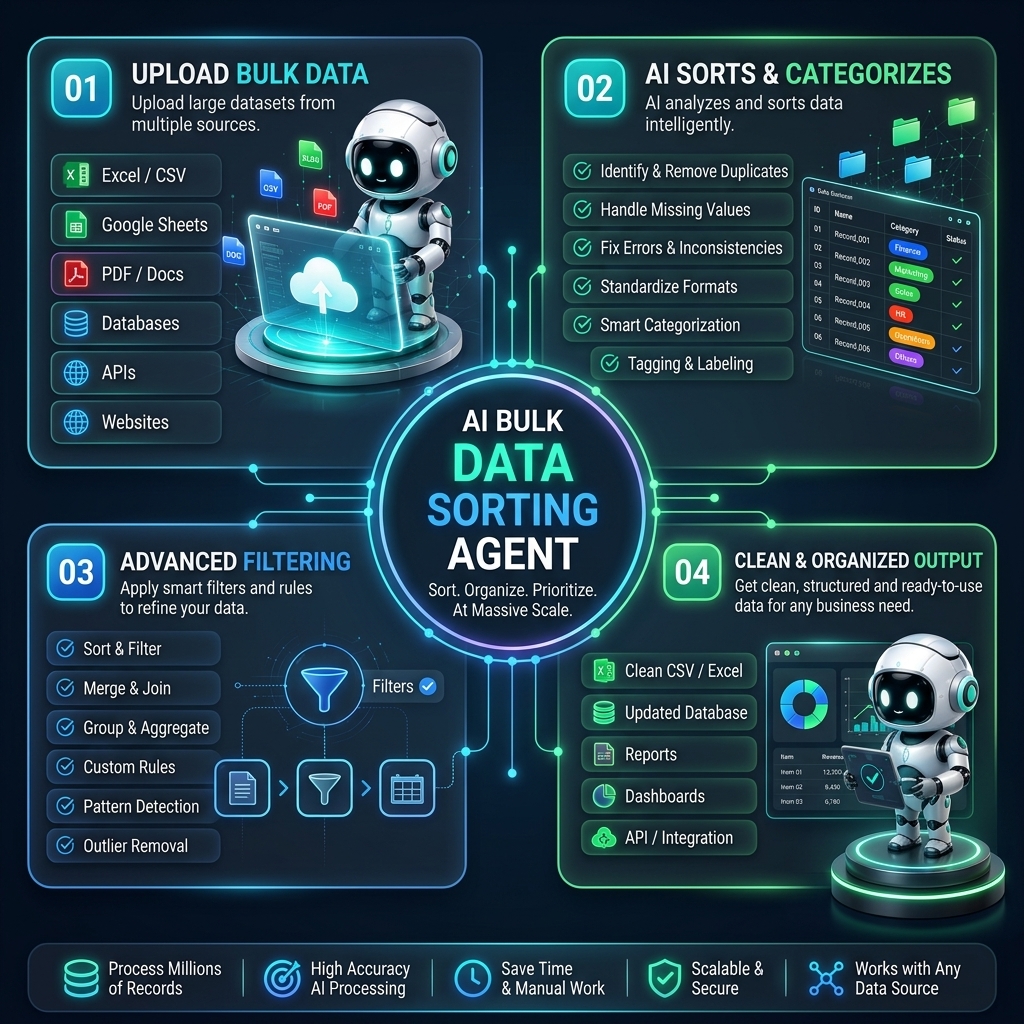
Upload multiple Excel, CSV, or spreadsheet files at once and let AI clean, merge, sort, and categorize your data automatically. Our AI Bulk Data Sorting Agent organizes records by country, city, name, category, date, or any custom field you choose, helping teams eliminate manual spreadsheet work and get structured, ready-to-use data in minutes.

AI DATA SORTING IN ACTION

Watch your AI Data Sorting Agent organize files in real-time

See how the AI reads multiple spreadsheets together, detects columns automatically, removes duplicates and errors, and sorts everything into clean, filtered sheets — country-wise, name-wise, or by any field you select, with one click.

AI Bulk Data Sorting Agent in action dashboard

FROM MESSY FILES TO CLEAN SHEETS

How your AI Bulk Data Sorting Agent organizes data step by step

  1. 01

    Upload multiple files

    Add all your Excel, CSV, or spreadsheet files together in one go — no need to merge them manually first.

  2. 02

    AI reads & auto-detects fields

    The AI scans every file, identifies columns like name, country, city, phone, category, and matches similar fields across files.

  3. 03

    Sort, filter & categorize

    Choose how you want the data organized — country-wise, name-wise, date-wise, or with custom filter buttons — and the AI structures it instantly.

  4. 04

    Generate clean, downloadable reports

    Get a single, deduplicated, well-organized file or category-wise sheets ready to use, download, or plug into your other tools.

WHO NEEDS IT?
📊

Data & Operations Teams

Combine scattered spreadsheets from different sources into one clean, sorted master file without manual copy-pasting.

📈

Sales & Marketing Teams

Sort leads and customer lists country-wise, region-wise, or by any custom filter to run targeted campaigns faster.

💼

Business Analysts

Merge multiple data files, remove duplicates, and organize records by category for faster, more accurate reporting.

🛒

E-commerce & Retail

Sort large product, customer, or order files by country, category, or date to manage inventory and customers with ease.

📑

HR & Recruitment Teams

Organize candidate data from multiple sheets by location, role, or experience level in one structured database.

🚀

Growing Startups

Handle bulk data cleanup and sorting automatically as your files grow, without hiring a dedicated data-entry team.

FAQ

AI Bulk Data Sorting Agent FAQs

Get quick answers about how our AI agent automatically merges multiple files and sorts your data.

Bulk File Merging Auto Data Sorting Custom Filtering

The AI reads multiple Excel or CSV files at once, automatically matches similar columns across files, removes duplicates and errors, and sorts everything into clean, structured sheets based on the fields you choose — such as country, name, category, or date.

You can upload and sort up to 100 files (Excel, CSV, or spreadsheets) simultaneously, with a total file size of up to 500MB per batch.

Yes, absolutely. The AI detects all columns automatically, allowing you to click a button or set custom rules to sort and filter your records country-wise, city-wise, category-wise, or by any specific custom field of your choice.

We support all standard spreadsheet formats, including .xlsx, .xls, .csv, .ods, and direct integrations with Google Sheets.

Yes, we prioritize security. All uploads are encrypted in transit and at rest with SSL and AES-256 encryption. Files are processed securely in sandbox environments and automatically deleted after processing, ensuring complete compliance with GDPR and HIPAA data policies.
Workspace illustration for contact

Get in Touch

Leave your message and we'll get back to you shortly.