AI AUTOMATION • DATA ENRICHMENT

FULL-STACK AI
DATA MANAGEMENT AGENT

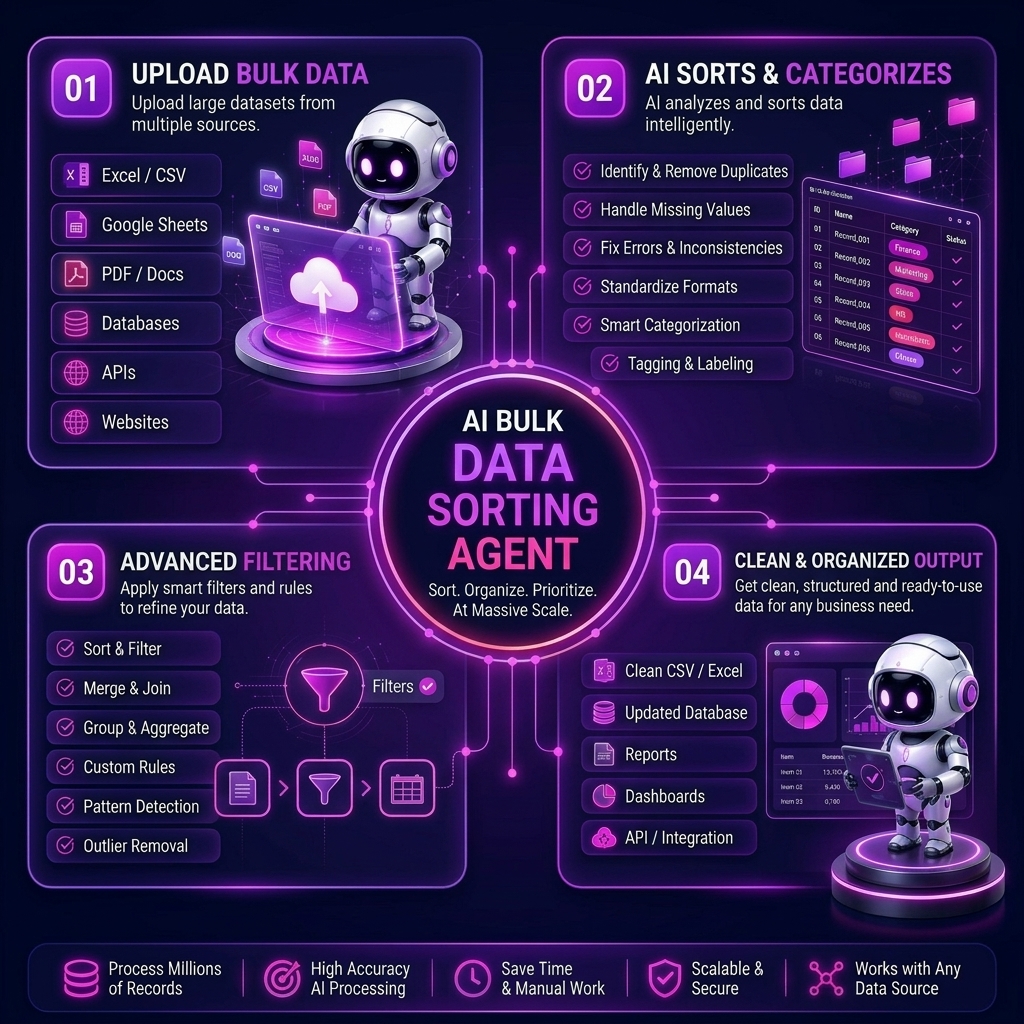
Upload multiple Excel, CSV, or spreadsheet files at once and let AI clean, merge, sort, and enrich your data automatically. Our AI Agent goes beyond simple sorting—it automatically finds social media links (Instagram, Facebook, LinkedIn) from names, discovers location-wise data, and organizes records by country, city, category, or any custom field. Eliminate manual spreadsheet work and endless web searching to get structured, ready-to-use lists in minutes.

AI DATA MANAGEMENT & DISCOVERY IN ACTION

Watch your AI Agent organize files and fetch social profiles in real-time

See how the AI reads multiple spreadsheets together, detects columns automatically, and removes duplicates. Watch as it searches for missing social media profiles (Insta, FB) based on the names provided, and sorts everything into clean, filtered sheets—location-wise, name-wise, or by any field you select—with just one click.

AI Bulk Data Management Agent in action dashboard

FROM MESSY FILES TO ENRICHED SHEETS

How your AI Bulk Data Management Agent works step by step

  1. 01

    Upload multiple files

    Add all your Excel, CSV, or spreadsheet files together in one go—no need to merge them manually first.

  2. 02

    AI reads & discovers social profiles

    The AI scans every file, identifies columns, and automatically searches the web to find and append missing social media links (Instagram, Facebook, LinkedIn) matched to the names in your dataset.

  3. 03

    Find locations & sort via custom filters

    Choose how you want the data organized. Use the location-wise finder to group records strictly by city or country, or use custom filter buttons (name-wise, date-wise) to instantly structure your data.

  4. 04

    Generate clean, downloadable reports

    Get a single, deduplicated, enriched master file or category-wise sheets ready to use, download, or plug directly into your CRM or outreach tools.

WHO NEEDS IT?
📊

Data & Operations Teams

Combine scattered spreadsheets from different sources into one clean, sorted master file while automatically filling in missing social data points without manual copy-pasting.

📈

Sales & Marketing Teams

Build rich prospect lists. Find social links for your leads and sort them location-wise to run highly targeted, multi-channel campaigns faster.

💼

Business Analysts

Merge multiple data files, remove duplicates, and organize enriched records by category or geography for faster, more accurate reporting.

🛒

E-commerce & Retail

Sort large product, customer, or order files by country and use location-wise data to better understand regional audiences and localize your marketing.

📑

HR & Recruitment Teams

Instantly enrich candidate databases. Upload applicant lists to automatically fetch their social profiles and organize them by location, role, or experience level.

🚀

Growing Startups

Handle bulk data cleanup, lead enrichment, and sorting automatically as your files grow, without hiring a dedicated data-entry or web-research team.

FAQ

AI Bulk Data Management Agent FAQs

Get quick answers about how our AI agent automatically merges multiple files, finds social links, and sorts your data.

Bulk File Merging Social Link Discovery Auto Data Sorting Custom Filtering

The AI reads multiple Excel or CSV files at once, matches similar columns across files, and removes duplicates. It also acts as an automated researcher, fetching social media profiles (FB, Insta, LinkedIn) for the names in your list and sorting everything into structured sheets based on locations, categories, or custom fields.

You simply upload your list of names (and optionally, companies or base locations). The AI securely searches public directories to fetch matching social media URLs and adds them as brand-new columns directly into your spreadsheet.

Yes! You can set the agent to group your data strictly location-wise (by country, state, or city). You can also use custom buttons to sort category-wise, name-wise, or by any specific parameter your team needs.

You can upload dozens of spreadsheets simultaneously. The AI will cross-reference all of them, merge the data, remove duplicate entries, and output a single unified file.

The agent seamlessly supports CSV, Excel (.xlsx, .xls), and standard spreadsheet exports for both uploading your raw data and downloading your final, enriched reports.

Absolutely. Your uploaded files are encrypted, processed securely for sorting and enrichment, and immediately deleted from our active servers once your report is generated. We never use your private data to train public AI models.
Workspace illustration for contact

Get in Touch

Leave your message and we'll get back to you shortly.